description: Agent used to to answer queries on Airtable table.
Airtable Agent
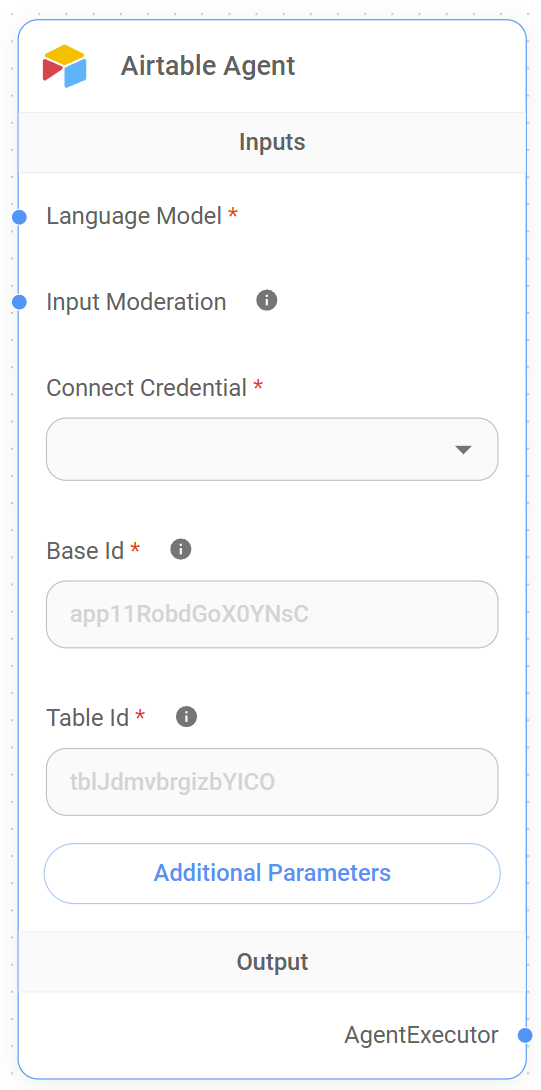
Airtable Agent Node
Airtable Agent Functionality
The Airtable Agent is a specialized node designed to answer queries about data stored in Airtable tables. It combines the power of language models with the ability to interact with Airtable data, allowing users to ask questions and receive insights about their Airtable content.
For example, the Airtable Agent can be used to answer questions like:
- "How many tasks are still incomplete in my project tracker table?"
- "What are the contact details of the clients listed in the CRM?"
- "Give me a summary of all records added in the past week."
This functionality helps users answer queries on Airtable tables, get insights from their Airtable bases without needing to navigate through the Airtable interface, making it easier to manage and analyze their data in a seamless, interactive way.
Inputs
The Airtable Agent requires the following inputs to function effectively:
Required Parameters
- Language Model: The language model to be used for processing queries. This input is required and helps determine the quality and accuracy of responses provided by the agent.
- Base ID: The ID of the Airtable base to connect to. This is a required field and can be found in the Airtable API documentation or the base settings. If your table URL looks like
https://airtable.com/app11RobdGoX0YNsC/tblJdmvbrgizbYlCO/viw9UrP77idOCE4ee,app11RobdGoX0YNsCis the Base ID. It is used to specify which Airtable base contains the data to be queried. - Table ID: The ID of the specific table within the Airtable base. This is also a required field and helps the agent target the correct table for data retrieval. In the example URL
https://airtable.com/app11RobdGoX0YNsC/tblJdmvbrgizbYlCO/viw9UrP77idOCE4ee,tblJdmvbrgizbYlCOis the Table ID. - Connect Credential: Required input to connect to Airtable. Users must select the appropriate credential that has permissions to access their Airtable data.
Optional Parameters
- Input Moderation: Optional input that enables content moderation. This helps ensure that queries are appropriate and do not contain offensive or harmful content.
- Additional Parameters: Optional parameters that can be used to customize the behavior of the agent. These parameters can be configured based on specific use cases.
- Return All: This option allows users to return all records from the specified table. If enabled, all records will be retrieved, otherwise, only a limited number will be returned.
- Limit: Specifies the maximum number of records to be returned if Return All is not enabled. The default value is
100.
Ouput
A detailed answer to the query, based on analysis of the Airtable data.
How It Works
- The agent first retrieves data from the specified Airtable base and table using the provided credentials.
- The data is converted to a Pandas DataFrame using Pyodide (a Python runtime for the browser).
- A language model interprets the user’s query and generates Python code to analyze the data.
- The generated Python code is executed using Pyodide to perform the analysis.
- The results of the analysis are then passed back to the language model to generate a human-readable response.
- The final answer is returned to the user.
Note: This section is a work in progress. We appreciate any help you can provide in completing this section. Please check our Contribution Guide to get started.